
SMS Two-Factor Authentication
Imperigo offers optional SMS-based two-factor authentication to registered account holders. This page describes the program, how users consent to receive messages, and how to opt out.
On this page
Program overview
Imperigo is a research platform for publicly filed IRS Form 990 nonprofit data, operated by Imperigo at imperigo.com.
Account holders may optionally enable two-factor authentication on their account. One of the available methods is SMS: a one-time numeric security code sent by text message to a mobile number the user provides.
This messaging program sends transactional security codes only. Imperigo does not send marketing, promotional, or informational SMS messages of any kind.
How users opt in
Opt-in happens inside a registered Imperigo account. There is no other way to be enrolled in this program. Numbers are never imported, purchased, or added on a user's behalf.
- The user creates an account at imperigo.com and verifies their email address.
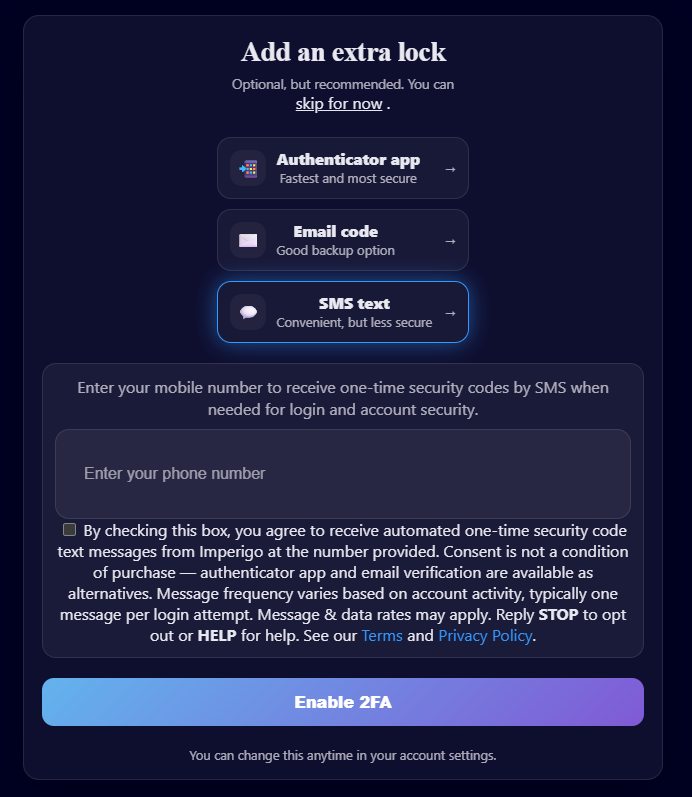
- The user is shown the two-factor authentication setup screen, where SMS is one of three options alongside an authenticator app and email codes.
- The user selects SMS text, enters their own mobile number, and checks the consent box shown below.
- A confirmation code is sent to that number and must be entered to complete enrollment.
Users may also enable, change, or disable SMS two-factor authentication at any time from Account → Security.
Screenshot of the opt-in screen
The image below shows the actual enrollment screen presented to users, with the SMS option selected, the mobile number field, and the consent checkbox.
Consent language
This is the exact text displayed beside the consent checkbox on the enrollment screen. The box is unchecked by default and must be actively checked by the user before enrollment can proceed.
By checking this box, you agree to receive automated one-time security code text messages from Imperigo at the number provided. Consent is not a condition of purchase — authenticator app and email verification are available as alternatives. Message frequency varies based on account activity, typically one message per login attempt. Message & data rates may apply. Reply STOP to opt out or HELP for help.
Each opt-in is recorded with a timestamp, the mobile number provided, the IP address of the request, and the exact consent text shown at the time.
Sample messages
Every message sent under this program follows the same format. Messages contain no links and no promotional content.
- Your Imperigo verification code is 483920. It expires in 10 minutes. Reply HELP for help, STOP to opt out.
- Your Imperigo verification code is 271465. It expires in 10 minutes. Reply HELP for help, STOP to opt out.
- Imperigo: You are now enrolled in SMS two-factor authentication. Msg frequency varies. Msg & data rates may apply. Reply HELP for help, STOP to opt out.
Message frequency and rates
Message frequency varies based on your account activity — typically one message per login attempt or security-related account change. Messages are sent only in response to an action you take.
Message and data rates may apply. Carriers are not liable for delayed or undelivered messages.
How to opt out
Reply STOP to any message to unsubscribe immediately. You may also reply STOPALL, UNSUBSCRIBE, CANCEL, END, or QUIT.
After opting out you will receive one confirmation message and no further messages:
- Imperigo: You have been unsubscribed and will no longer receive SMS verification codes. Reply START to re-subscribe.
You can also disable SMS two-factor authentication at any time from Account → Security. If you opt out, you will need to use an authenticator app or email verification to sign in.
To re-subscribe, reply START or re-enable SMS in your account settings.
Getting help
Reply HELP or INFO to any message to receive:
- Imperigo 2FA support: hello@imperigo.com. Msg & data rates may apply. Reply STOP to opt out.
You can also reach us any time at hello@imperigo.com or through our contact form.
Privacy
Your mobile phone number is used solely for authentication purposes. No mobile information will be sold or shared with third parties or affiliates for marketing or promotional purposes. Mobile information may be shared with subcontractors in support services, such as our SMS delivery provider, solely to deliver the messages you have requested.
Full details are in our Privacy Policy and Terms of Service.